

10 Smart Home Upgrades for a Safer, Easier-to-Manage Home
10 Smart Home Upgrades for a Safer, Easier-to-Manage Home
A smart home does not have to mean a house filled with complicated gadgets. The most useful technology often performs one simple job well: turning on a light, alerting you to a leak, showing you who is at the door, or letting you check the thermostat while you are away.
For homeowners planning to remain in their homes for years to come, these small conveniences can become increasingly valuable. They may help simplify everyday routines, provide earlier warnings about household problems, and make certain parts of the home easier to manage.
Research conducted by The Hartford Center for Mature Market Excellence and the MIT AgeLab evaluated 25 smart-home technologies with input from experts in housing, aging, design, engineering, and related fields. Many of the technologies they identified remain practical today, even as available features and connectivity have continued to improve.
Here are ten smart home upgrades worth considering as part of a broader aging-in-place plan.
1. Smart Smoke and Carbon Monoxide Detectors
Traditional smoke and carbon monoxide detectors sound an alarm inside the home. Smart versions can also send an alert to a smartphone or another approved contact.
This can be especially helpful when a homeowner is traveling, spending time at a second home, or simply in a part of the house where an alarm may be difficult to hear. Depending on the system, an alert may indicate whether the concern involves smoke, fire, or carbon monoxide.
Smart features do not eliminate the need to test alarms regularly, replace batteries, and follow the manufacturer’s replacement schedule.
2. Video Doorbells and Keyless Entry
A video doorbell allows a homeowner to see and speak with someone at the door without approaching or opening it. It may be useful for checking deliveries, communicating with contractors, screening unexpected visitors, or monitoring the entrance while away.
A smart lock or keyless-entry system can make access easier by replacing or supplementing a traditional key with a code, smartphone, or other approved method.
Some systems allow homeowners to create separate temporary codes for relatives, caregivers, house cleaners, or service providers. Those codes can then be changed or removed when access is no longer needed.
For greater security, avoid sharing one permanent code with everyone. Review access regularly and delete codes that are no longer being used.
3. Automatic and Motion-Activated Lighting
Good lighting is one of the simplest ways to make a home easier to navigate.
Motion-activated lights can illuminate a space automatically, while smart bulbs and switches can be scheduled or controlled by voice, phone, or wall switch. Particularly useful locations include:
- Stairways and hallways
- Bathrooms
- Closets
- Garages
- Exterior walkways
- The route between the bedroom and bathroom
Motion-activated nightlights are an inexpensive place to begin and do not require an entire smart-home system.
When selecting smart lighting, make sure it can still be operated with a familiar wall switch. A homeowner should not need to find a phone or open an application simply to turn on a light.
4. Water-Leak Sensors and Automatic Shutoff Valves
A small plumbing leak can quickly cause extensive damage if it goes unnoticed.
Wireless leak sensors can be placed near common problem areas, including:
- Water heaters
- Washing machines
- Dishwashers
- Toilets and sinks
- Sump pumps
- Refrigerators
- Basement drains
- HVAC equipment
When moisture is detected, the sensor sends an alert. Some systems can be connected to a smart water valve that automatically shuts off the home’s main water supply.
A shutoff system may be particularly valuable for homeowners who travel frequently or divide their time between more than one residence. Professional installation may be required, especially when a device connects directly to the home’s plumbing.
5. Connected Security and Garage-Door Systems
Modern home-security systems can combine door and window sensors, motion detectors, exterior cameras, glass-break sensors, garage-door monitoring, and optional professional monitoring.
Alerts may let a homeowner know when:
- A door or window has opened
- Motion has been detected
- A camera identifies a person
- An alarm has been activated
- The garage door has been left open
A smart garage-door controller is a relatively simple addition that allows someone to check the door’s status and close it remotely.
Cameras should be positioned thoughtfully. Exterior cameras may provide reassurance without creating the privacy concerns associated with cameras in interior living spaces.
6. Smart Plugs and Outlets
Smart plugs allow compatible lamps and small devices to be turned on or off remotely or placed on a schedule.
They can be useful for:
- Turning on a lamp before entering the house
- Scheduling lights while traveling
- Controlling seasonal decorations
- Checking whether a compatible device was left on
Not every appliance is appropriate for remote switching. Devices that produce significant heat should not be connected to a smart plug unless both the appliance and smart-plug manufacturers specifically permit that use.
7. Smart Thermostats and Environmental Monitors
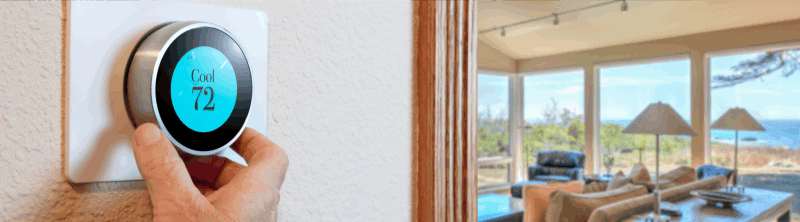
A smart thermostat can adjust the temperature according to a schedule and allow a homeowner to check conditions remotely.
Depending on the model, it may also provide:
- Humidity information
- Energy-use reports
- Filter-replacement reminders
- Alerts when the home becomes unusually hot or cold
- Notifications that could indicate a heating or cooling problem
Temperature alerts may help identify a malfunction before it leads to uncomfortable conditions or frozen pipes.
Choose a thermostat with a large, readable display and straightforward manual controls. It should remain easy to operate even when a smartphone or internet connection is unavailable.
Separate air-quality and humidity monitors can also alert homeowners to changing indoor conditions. These devices do not replace smoke detectors, carbon monoxide detectors, professional mold inspections, or medical guidance.
8. Motorized Window Shades
Motorized blinds and shades can be opened or closed with a remote control, wall switch, voice command, or schedule.
They may be helpful for windows that are difficult to reach or for homeowners who find cords and heavy blinds increasingly challenging to operate. Scheduled shades can also improve privacy, reduce glare, and help manage indoor temperature throughout the day.
Cordless window treatments offer an additional safety benefit in homes frequently visited by young grandchildren or pets.
9. Kitchen Safety Technology
The kitchen is another area where targeted technology may provide helpful reminders and earlier warnings.
Available features can include:
- Notifications when a stove or oven has been left on
- Automatic stove-shutoff systems
- Timers and voice reminders
- Alerts when unusual heat or smoke is detected
- Notifications when a refrigerator door remains open
- Maintenance alerts from connected appliances
Compatibility should be carefully confirmed before installing any automatic shutoff equipment. Some systems may require professional installation.
Technology can provide an additional layer of support, but it should not take the place of safe cooking practices or appropriate assistance when someone is experiencing significant memory changes.
10. Voice Assistants and Centralized Controls
Managing a separate application for every device can quickly become frustrating. A voice assistant, smart display, or centralized control panel can make it possible to operate several compatible devices from one place.
A well-designed system may allow a homeowner to control lighting, locks, temperature, shades, cameras, and entertainment without navigating numerous menus.
Look for:
- Large text and recognizable icons
- Simple navigation
- Voice-control options
- Manual controls
- Clear emergency functions
- Compatibility with existing devices
- The ability to give family members limited access
Voice-assistant purchasing features, saved payment information, contact lists, and privacy settings should be reviewed carefully during setup.
Questions to Ask Before Buying Smart-Home Technology
The best choice is not necessarily the newest or most advanced product. Before purchasing a device, consider the following:
What specific problem will it solve?
Begin with one recurring concern, such as poor nighttime lighting, water damage, difficulty reaching a thermostat, or uncertainty about whether the garage door is closed.
Is it easy to use without a smartphone?
Look for clear displays, familiar controls, and a manual option. Technology should simplify the routine rather than create another obstacle.
Does it require a subscription?
Some products charge ongoing fees for professional monitoring, cloud storage, cellular service, or advanced features. Understand the full cost before purchasing.
What happens during a power or internet outage?
Ask whether the device has battery or cellular backup and which functions will continue to work offline.
Will it work with other devices?
Whenever possible, select products that operate within the same system. You may also see the Matter logo on newer products. Matter is a smart-home compatibility standard intended to make it easier for certified devices from different manufacturers to work together.
Who will receive the alerts?
Decide whether notifications should go only to the homeowner or also to an approved relative, neighbor, or caregiver. Every alert should have a clear purpose and someone prepared to respond.
How will personal information be protected?
Use strong, unique passwords and enable multifactor authentication when available. Keep device software updated and use guest access or temporary codes instead of sharing the primary account password.
Build the System Gradually
There is no need to automate the entire house at once.
If nighttime visibility is the primary concern, begin with motion-activated lighting. If water damage is a worry, start with leak sensors. Someone who travels frequently may find a video doorbell, thermostat alerts, and a garage-door controller especially useful.
Introduce one or two devices, make sure they are genuinely helpful, and allow everyone time to become comfortable using them before adding more.
Smart Technology Is Only One Part of the Home
Technology may make a home easier to monitor and manage, but it cannot correct every physical challenge.
A complete aging-in-place assessment may also consider improved lighting, secure handrails, nonslip flooring, grab bars, reduced clutter, a low-threshold shower, step-free entry, and access to a bedroom and full bathroom on the main level.
It is also important to consider the ongoing cost of home maintenance, the availability of nearby support, transportation needs, and whether the home’s layout will continue to fit the homeowner’s lifestyle.
For some Northern Virginia homeowners, thoughtful modifications and carefully selected technology may allow the current home to work well for years. For others, right-sizing or moving to a 55+ community may offer a more comfortable and manageable next chapter.
Through Next Chapter Living, The Lutkins Group helps Northern Virginia homeowners and families explore whether aging in place, right-sizing, or moving to a 55+ community best supports their goals. If you are beginning to think about what comes next, contact our team to start the conversation.

Frequently Asked Questions
What is the best smart-home upgrade for aging in place?
The most helpful upgrade depends on the homeowner and the home. Motion-activated lighting, water-leak sensors, video doorbells, smart thermostats, and connected smoke detectors are practical starting points because each addresses a common household concern.
Do smart-home devices work without Wi-Fi?
Some devices retain basic functions during an internet outage, while remote alerts and app controls may stop working. Review backup options and offline functionality before purchasing.
Can family members receive smart-home alerts?
Many systems allow alerts or limited access to be shared with an approved family member or caregiver. The homeowner should understand and consent to what is shared, who can access it, and how that information will be used.
Do smart-home upgrades increase a home’s value?
Smart features may make a home more convenient and appealing to some buyers, but they do not guarantee a specific return. Choose upgrades primarily because they improve the home’s function for the people currently living there.
Categories
Recent Posts